Work & School 7 min read
8 Ways the IBM Selectric Typewriter Defined the Modern Office
Before the cursor blinked on a screen, the Selectric ball danced across paper. Remember these mechanical marvels that hummed in every office.
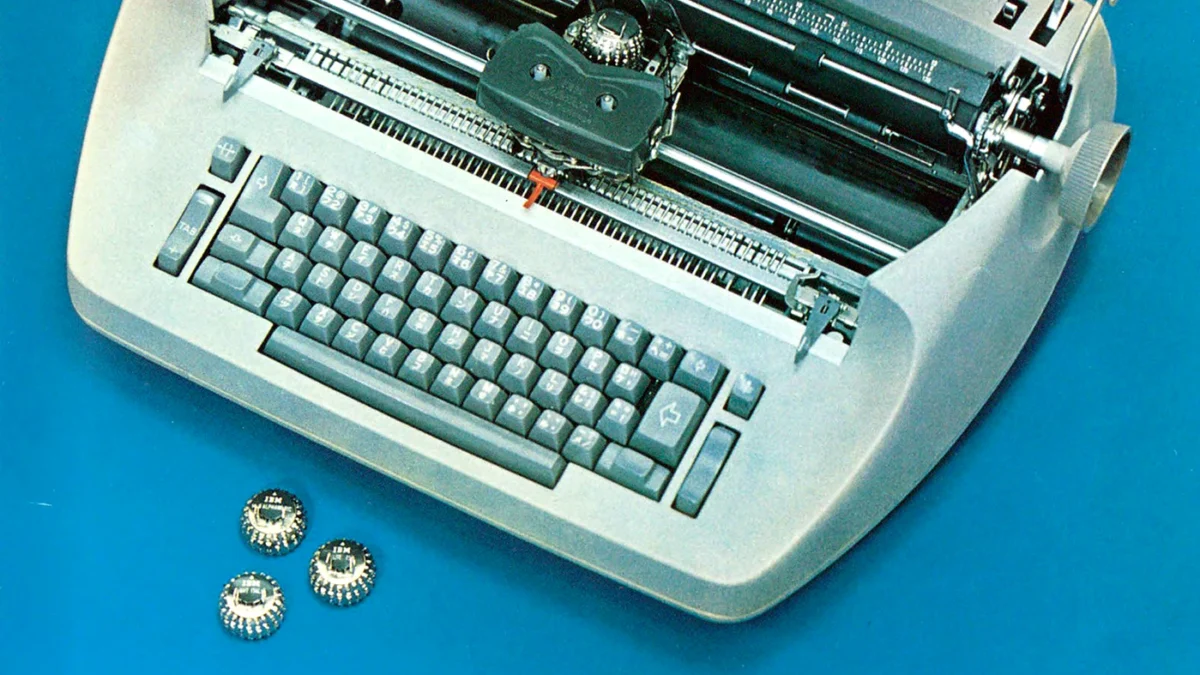

If you walked into a bustling office during the mid-twentieth century, the sound was unmistakable. It wasn’t just the clack of keys, but a steady, rhythmic mechanical hum. The IBM Selectric was the heartbeat of the professional world, a desktop powerhouse that replaced clunky type bars with a single, spinning element. You remember that motion, don’t you? That rapid-fire dance of a golf ball-sized type head striking the ribbon, turning raw thoughts into clean, crisp lines of text.
For millions, the Selectric wasn’t just office furniture; it was the primary gatekeeper of communication. Whether you were drafting a legal brief, a personal letter, or a corporate memo, you relied on that distinct feel and the satisfaction of a perfect keystroke. As the 1970s bled into the 1980s, these machines held their ground against the first waves of digital change. Even as personal computers began to sprout on desks, many of us weren’t ready to let go of the physical tactile feedback of the Selectric. It felt permanent, sturdy, and reliable in a way that early, flickering monitors simply couldn’t replicate. Looking back, we see that the transition from manual movement to software automation didn’t happen overnight. It happened one correction ribbon at a time, in quiet rooms filled with the scent of ozone and ink.
Number 1: The Golf Ball Element Changed How We Wrote
In 1966, the arrival of the IBM Selectric instruction manual signaled a shift in how we approached our daily output. Before this, you were limited by the rigid layout of standard typewriter arms. Suddenly, you could swap out a single type element for a different font style in seconds. It was a massive leap forward for anyone who cared about the look of their documents.
You might recall spending time choosing from dozens of available typefaces, each offering a specific professional tone. The 1966 manual emphasized that with just 1 element, you could change your entire document’s aesthetic. It felt like magic, having that degree of control right at your fingertips. Eventually, though, the demand for modularity faded when software fonts made the process instantaneous. It turned from a physical hobby into an invisible digital setting, and we lost the tactile joy of physically clicking that metal ball into place.
Source: ibm :: typewriter :: selectric :: 241-5032-2 Selectric Instruction Manual Jan66 (1966)

Number 2: Swapping Type Styles Offered Unprecedented Creative Freedom
By 1972, IBM released a brochure highlighting the vast array of type styles available for the Selectric. Whether you needed a formal serif for contracts or a clean sans-serif for casual correspondence, the selection was impressive. There were over 10 different styles often available for a single machine, allowing typists to customize their output with professional flair.
Think about the precision involved in changing those heads. You had to align them perfectly or risk a misaligned letter. It was a mechanical ritual that defined the workday for many. While today we simply toggle a menu, back then, owning a collection of 5 distinct type elements felt like having a personal print shop on your desk. The sheer variety felt like the height of personalization. That sensation of clicking a new style into position—ready to impress a boss or client—remains a core memory of the office landscape.
Source: IBM Selectric Typewriter Type Styles (brochure, 1972) (1972)
Number 3: The Model 71x Series Built the Foundation of Productivity
Looking at a 1971 parts catalog, you get a sense of how complex these machines truly were. The Model 71x and 72x series contained thousands of individual components designed to work in perfect harmony. With over 500 distinct parts listed in the assembly manual, the Selectric was as much an engineering marvel as it was a tool for writing.
You probably remember the heavy sound of the housing being opened for service. When something jammed, you didn’t just throw it away. You opened the top cover and went in with tweezers and oil. It was a machine you could actually know, inside and out. Modern technology often feels like a black box by comparison, but with the Selectric, you felt the gravity of every cog and spring. When the era of these machines ended, we stopped being mechanics of our own equipment and started being mere users of disposable plastic.
Source: ibm :: typewriter :: selectric :: PCE-009-1 Parts Catalog Selectric Model 71x 72 (1971)
Number 4: Operating the Selectric II Required a New Rhythm
The 1971 operating instructions for the Selectric II showed us that work was about to get faster. This machine introduced the concept of the correcting ribbon, which was revolutionary for the time. For about 30 seconds of effort, you could lift a mistake right off the page without messy white-out fluid. It saved hours of frustration for everyone typing reports in the 1970s.
There was a specific, satisfying sound to the strike-correction key. You pressed it, and the machine performed the cleanup itself. Do you remember the small, messy tape spools that inevitably got stuck? It was a minor irritation, but it was a small price to pay for a clean, error-free page. It was the first time we truly felt that typing could be effortless, and it set a standard for perfection that we still chase today in our word processors.
Source: IBM Selectric II Typewriter Operating Instructions (manual) (1971)
Number 5: The 1975 Service Manual Kept Offices Humming
By 1975, the IBM service manual became the most important document in the office supply cabinet. These machines were durable, but they required regular calibration to function. An office manager might keep 2 copies of the guide on hand just to ensure that the staff could troubleshoot basic issues before calling for professional help.
It was common to see a staff member hunched over the machine, checking the tension on the drive belt or cleaning the type carrier. This wasn’t a chore; it was maintenance, a sign that your tool was worth caring for. The machine required about 15 minutes of routine cleaning each month to keep it running smoothly. There was a real sense of pride in keeping a Selectric in top form. When those machines finally hit the surplus bin, it felt like the end of an era where things were built to be repaired rather than discarded.
Number 6: Correcting Features Changed the Stakes of Typing
When the Correcting Selectric III arrived in 1982, it represented the final peak of the mechanical era. By this time, electronic typewriters were beginning to offer 80 characters of memory for correction, a massive jump from the manual lift-off methods of a decade earlier. It was a bridge between the old analog world and the incoming digital tide.
You likely remember the shift in the office atmosphere as these newer, quieter models were rolled out. The frantic stress of making a permanent mistake vanished, replaced by a calm, mechanical confidence. It was the last moment before computers took over our desks entirely. Using this machine felt like having the power of a word processor without the intimidating screen. It was the perfect, final iteration of a classic design, providing a level of polish that felt almost luxurious before the digital age made perfection the standard expectation.
Source: IBM Electronic Typewriter 65/85 and IBM Correcting Selectric III typewriter (bro (1982)
Number 7: The 1970 Parts Manual Defined Precision Engineering
The 1970 parts catalog for the Model 71x and 72x units is a testament to the era’s obsession with reliability. Every single screw, spring, and bracket had a designated number. You might see 30 different washers listed just for the keyboard assembly alone. It was an incredibly dense document, meant for technicians who treated every typing error as a mechanical failure that could be fixed.
It’s fascinating to look back and see how much effort went into ensuring these machines lasted for 10 years or more. We didn’t look at a typewriter and see a temporary solution; we saw a lifelong investment. The weight of the metal casing—often 30 pounds of steel—told you everything you needed to know about its longevity. When you sat down, you weren’t just typing; you were operating a serious piece of industrial machinery that earned its place on your desk every single day.
Source: ibm :: typewriter :: selectric :: PCE-008-1 Parts Catalog Selectric Model 71x 72 (1970)
Number 8: Operating Instructions for the 1971 Classic Model
The 1971 operating instructions served as the bible for the office workforce of the time. These manuals were distributed to every new hire, ensuring that the 45 rpm equivalent of typing speed was reached by every secretary in the company. It covered everything from basic carriage returns to the complex nuances of using the margin sets.
If you were the person in charge of the typing pool, you knew these 20 pages by heart. The feeling of finally mastering the machine—the way the keys felt against your fingers, the rhythmic carriage return bell—was a rite of passage. It wasn’t just about output; it was about mastering a craft. Today, when we type on flat, silent membranes, we often miss that physical resistance. The Selectric demanded engagement and gave back a rhythm that made the long hours of a workday feel like a productive, steady march toward completion.
Source: IBM Selectric Typewriter Operating Instructions, 1971 (manual) (1971)
The IBM Selectric was more than a tool; it was the steady hum in the background of our lives. It taught us about precision, maintenance, and the satisfaction of a job done well. Do you still remember the exact sound that bell made when you reached the end of a line, or have the memories of that machine finally faded into the digital noise of today?